Parking at CCHS
Students at Cypress Creek can earn the privilege to park on campus by completing the required four‑step parking approval process. Once approved, students will receive an official parking permit that must be displayed at all times while parked on school property.
Parking privileges are not guaranteed and may be revoked at any time for unsafe or irresponsible behavior. This includes—but is not limited to—reckless driving, unsafe operation of a vehicle, or failure to meet school behavior and attendance expectations.
Important Links:

Student Parking Guidelines
To maintain safety and organization on campus, all student drivers must follow the guidelines below:
- Parking Tags: Must be clearly visible at all times while on campus.
- Parking Direction: No backing into spaces—all vehicles must pull forward into their spot.
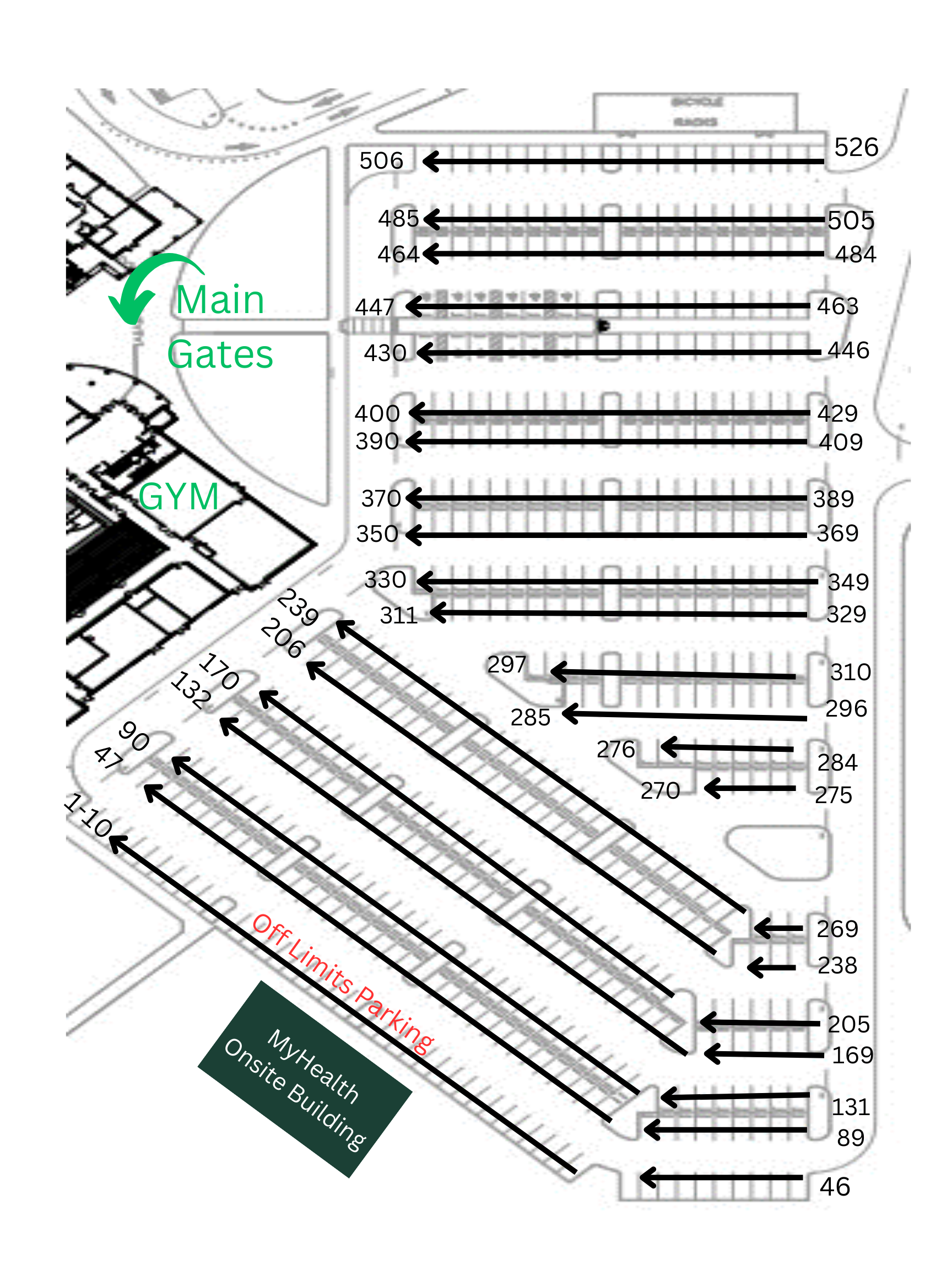
- Where to Park: Students may park in any unpainted, non‑reserved spot that is:
- Not near the MyHealth Onsite building (spots 11–46)
- Not marked with a senior design
- Reserved Spots 1–10: These spaces are designated for students with permit licenses participating in seat swaps with their parents.
Please follow all parking rules to avoid citations and help keep our campus safe, orderly, and accessible for everyone. Thank you!
Learner's Permits
If approved, the Learner’s Permit application allows parents to access the student parking lot at the beginning or end of the school day so they can safely switch seats with their student driver.
- Seat swaps are not allowed in the car loop under any circumstances.
- Parents and student drivers must use parking spots 1 & 2 to complete the seat‑switch process.
- The Learner’s Permit pass must be clearly displayed in the windshield in order to enter Student Parking.
- The permit pass must be returned to Student Services before a student can receive a full Student Parking Pass or by the end of the school year.
How to Get a Parking Pass
Pay the Student Parking Fee:
After completing the “Safe Behind the Wheel” course, students must purchase their parking pass. Parking passes cost $40.00 for the entire school year or $20.00 for Semester 2. There are limited parking spaces on campus, an tags are distributed on a first come, first serve basis. The parking pass fee can be found on Rycor, which can be accessed by clicking here.
Complete the Student Parking Application:
After completing the Safe Behind the Wheel course and paying the parking fee through Rycor, students must submit the Student Parking Application. To complete the application, students must upload a legible photo, scanned copy, or a screenshot of each of the following valid and approved documents:
- Driver’s License
- Auto Insurance Card
- Vehicle Registration
If a student needs to register multiple vehicles, a separate application must be completed for each vehicle.
To request a handicapped parking spot, email Mr. Schmidt with your request and supporting documentation prior to submitting Student Parking application.
You can access the Student Parking Application by clicking here.
Pick-up your Parking Tag:
The final step in the process is picking up your Parking Tag.
- Beginning of the school year: Parking tags can be picked up on the stage during lunch for the first two weeks of school.
- After the first two weeks: Tags will be available for pickup in Student Services.